Troubleshooting · a guide, not a sales page
Garage door sensor blinking: what it means and what to check
A blinking light is an opener talking to you in the only language it has. What the pattern means depends on who made the opener — but what to do first is the same on all of them.
The short answer
Why is my garage door sensor blinking? The short answer
A blinking sensor light, or an opener light that flashes and will not let the door close, usually means the safety beam is blocked, misaligned or dirty. On LiftMaster and Chamberlain openers, Chamberlain Group’s support pages say ten flashes of the main light point to the safety sensors, and two flashes mean the LOCK button on the wall control is on.
Clear the floor across the doorway, wipe both lenses, check that the pair face each other and that both lights glow steadily, then try the remote. Other makers use other codes, so the model number on the label is what finds yours.
On this page
What a blinking light is actually reporting
Two separate things blink on a garage door. The small lights on the photo-eyes at the foot of the tracks report the state of the safety beam. The light on the opener head itself often flashes a repeating pattern to report a diagnostic code.
They are related, because the safety beam is one of the things the opener’s own code can report. If a door will not close and something is blinking, start at the floor rather than at the ceiling.
The beam, and the five things that break it
- Something in the way The beam runs low across the opening. A bin, a hose, a bag of compost, a bike wheel.
- A dirty lens Dust, cobwebs, a film of grime. A soft dry cloth is the whole repair.
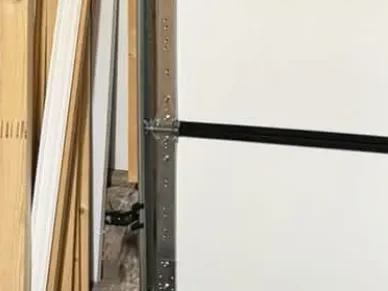
- Alignment A bracket knocked by a car door or a trash can. The pair has to face each other; most tell you with their own indicator light when they do.
- Low sun Direct sun into the receiving eye can wash the beam out at one time of day — a bracket-shading problem, not a fault.
- A damaged wire A staple through it, or a wire pulled by something moving. Look with your eyes, do not tug.
If the door closes normally afterwards, the code has done its job and there is nothing to buy.
Free Estimates
5-Year Warranty on All Parts & Labor.Five years on parts and labor, every repair and every install. We look at the door with you first, and nothing starts until you approve the number.
What the flashes mean on a LiftMaster or a Chamberlain
Chamberlain Group’s support site, which covers LiftMaster and Chamberlain together, publishes what the opener’s own flashes mean. It varies by model — some flash a count on the light beside the learn button, some flash the UP and DOWN arrows — so treat this as the common ones rather than the whole list.
- Main light flashes 10 times A problem with the safety reversing sensors. Chamberlain says to start by aligning them.
- Main light flashes 2 times The LOCK button on the wall control is on. The wall control still works and the remotes are locked out. Press LOCK to turn it off.
- UP and DOWN arrows: 1 up, 1 down Sensor wires are cut or not connected.
- 1 up, 2 down Sensor wires are reversed, or there is a short in the wiring.
- 1 up, 4 down The sensors are misaligned or were briefly blocked.
- Sending (amber) sensor steady, receiving (green) sensor off or flickering Chamberlain says this is typically a misaligned or obstructed sensor.
The two wiring rows are the ones to hand to a technician rather than pull at. The beam is a safety device, and a fault in its wiring is not a cleaning job.
Other makers use other tables
The code that means one thing on one opener means something else on another, and a table copied from the wrong maker sends people to buy parts they do not need. The list above is Chamberlain Group’s, for its own openers.
What is reliable is going to the support site of whoever made your opener, with the model number from the label on the back or side of the motor unit. The LiftMaster and Chamberlain badges are answered by the same support site, and Genie keeps homeowner resources of its own. Both are linked below.
One genuinely useful detail on a LiftMaster or a Chamberlain: the color of the learn button on the back of the unit tells you which radio system it uses, which is what decides whether a given remote can pair with it at all. That is the maker’s own documentation, linked below, and it saves a wasted purchase. LiftMaster has its own page here.
On a Genie, the rolling code changes on every press by design. A remote that has stopped working may need programming again before it needs replacing.
Where the beam should sit, and how often to test it
Chamberlain says the sensors sit no higher than 6 inches above the garage floor, usually fastened to the door tracks. DASMA, the door makers’ association, gives the same limit for the beam, and says the sensors should be within 6 inches of the door’s path.
DASMA also recommends testing the sensors monthly: start the door moving down, put a controlled obstruction in the beam, and check that the door reverses and returns fully open. (Our own advice: use something soft, never a hand or a foot.) DASMA says installation should always follow the opener maker’s instructions. A door that does not reverse is no longer a cleaning question: stop using it and call.
When blinking means stop rather than clean
- If the opener blinks and the door also moves crookedly, stop using it — that is a door problem the opener is reporting.
- If the code appeared at the same time as a loud bang, treat it as a spring first and a code second.
- Never disable, tape over or bypass the photo-eyes to silence a code. They are the reason a closing door stops for a child or a pet.
- Never work on the spring, cables or drums to clear a code.
Anything past cleaning, clearing and telling us what you see is a visit — opener repair covers the sensors, and a door that will not close all the way has its own checklist. Photo-eye alignment is one of the four things on the safety check we do on every visit, so it gets looked at whatever we came for.
Free Estimates · a person answers 24/7
5-Year Warranty on All Parts & Labor.Five years on parts and labor, every repair and every install. Call, or send the form and a person calls you back.
Sources
- Chamberlain Group — Garage door opener light blinks but the door won’t close
- Chamberlain Group — Troubleshoot garage door safety sensors that are off or flicker
- DASMA — Technical Data Sheet 364, “Installation Location of Photoelectric Sensors on Residential Garage Doors”
- LiftMaster — finding an opener’s technology from the color of its antenna or learn button
- The Genie Company — support and homeowner resources
Sources read , except the two Chamberlain Group pages and DASMA sheet 364, read . Linked so you can check them rather than take our word for it.
Written from the manufacturers’ own published guidance — every source is linked above.
Related reading
Where this goes next.
What you can count on
- Same-day service on most repairs.
- Upfront pricing. The price is on the estimate you approve before work starts, and the invoice matches it.
Straight answers
Questions people ask about this.
My sensor light is blinking and the door will not close. What is it?
Why does my opener light flash 10 times?
Why does my opener light flash twice?
What does a specific number of flashes mean?
How high should the garage door sensors be?
Can sunlight stop my garage door sensors working?
Where is the model number?
Is it the opener or the door?
Describe it however makes sense to you
Read enough? Tell us about the door.
However you describe it is enough — no part names needed. The visit and the written estimate cost you nothing, and nothing starts until you approve the number.
- However you describe it is enough. No part names needed.
- The written estimate is free. Nothing owed if you pass.
- Nobody starts the repair until you approve the number.
Calls Answered 24/7
One call, and the door problem becomes ours.
A person answers 24/7. We look at the door with you first, and the written estimate comes before the work.