Troubleshooting · a guide, not a sales page
myQ won’t connect to Wi-Fi: a safe checklist
Many myQ connection problems are network problems, not door problems. Work down this list before anybody resets anything, because Chamberlain says a factory reset of a Wi-Fi opener removes its remote controls, wireless keypads and HomeLink programming.
The short answer
Why has my myQ stopped connecting?
Check that the opener really has Wi-Fi built in, that the router still offers a 2.4 GHz network (Chamberlain says a 5 GHz-only network stops most myQ devices connecting), and that the network name or password has not changed. Then reconnect through the app’s own Update Wi-Fi Settings step.
Do not factory-reset the opener to fix a connection. Chamberlain says not to if you changed your Wi-Fi password, replaced your router or the device just appears offline, and that a reset removes a Wi-Fi opener’s remote controls, wireless keypads and HomeLink programming.
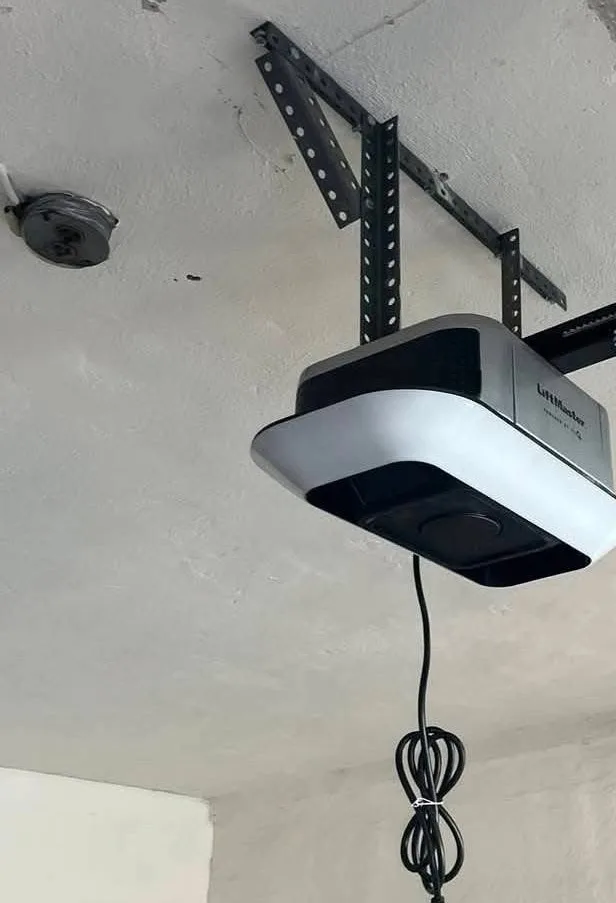
First, work out what hardware you actually have
Chamberlain Group separates two setups: an opener with Wi-Fi built in, and a separate hub near an older opener that adds Wi-Fi to it. They are set up differently, and Chamberlain’s own hub guide says to confirm which one you have before troubleshooting.
The opener’s label tells you the model. That model is what the manufacturer’s own support site matches to the right instructions. If you are weighing a smart opener rather than fixing one, smart opener or traditional sets out what the Wi-Fi adds.
Second, check whether the network changed
- Is the phone on the network you think it is on
- Has the network name or the password changed since it last worked
- Is 2.4 GHz switched on at the router. Chamberlain says most myQ devices connect on 2.4 GHz and a 5 GHz-only network will stop most of them; one combined network name does not by itself mean 2.4 GHz is missing, so check the router’s settings rather than the name
- Has the router been restarted. Chamberlain says to unplug the router or modem, plug it back in and wait for it to reconnect to the internet
- Is the network hidden, or set to enterprise security. Chamberlain lists hidden networks and WPA2 or WPA3 Enterprise as unsupported, and WPA2 or WPA3 Personal as what it needs (WPA3 with compatible firmware)
- Does the garage actually get a usable signal — Chamberlain says a hub has to be within range of your home Wi-Fi network, and a router at the far end of the house may not reach
- Does the opener or the hub have power
A new router, network name or password is a case Chamberlain has a whole reconnect page for. Nothing is broken; the opener is looking for a network that no longer exists.
Free Estimates
5-Year Warranty on All Parts & Labor.Five years on parts and labor, every repair and every install. We look at the door with you first, and nothing starts until you approve the number.
If you have a myQ hub: what its light says
Chamberlain’s support guide for its hubs reads the connection from the light on the front of the device. It covers the myQ Garage, the myQ Smart Garage Hub and the Smart Garage Control: the separate boxes that add Wi-Fi to an opener that has none built in.
- No light The hub is not getting power. Check the outlet and the plug.
- Blinking blue Ready for Wi-Fi setup, or it could not connect during setup.
- Solid blue Connected to your phone, not yet to your home Wi-Fi.
- Blinking blue and green It was connected and has lost the connection. The door still works from the remote, the wall control or the keypad; the app will not until it reconnects.
- Blinking green Connected to the router, but it cannot reach the myQ server.
- Solid green Connected to Wi-Fi. If the app still does not work, Chamberlain says the trouble may be with the myQ account or the device’s setup.
Chamberlain also says to mount the hub 4 to 6 feet from the opener and away from metal surfaces, and to keep it within range of your home Wi-Fi.
Third, use the app’s current flow
For a device that already appears in your myQ account and was connected before, after a new router, a new network name or password, or a new internet provider, Chamberlain’s steps are in the myQ app: tap the offline device on the Home screen, choose Reconnect your device, then Update Wi-Fi Settings, with Bluetooth on and the phone near the device. Each myQ device is reconnected separately, and if it fails Chamberlain says to restart the phone and the router and try once more.
If you moved into a home that already had a myQ device, or the app shows Error 310 or “device is on another account”, that is an ownership problem rather than a Wi-Fi one, and Chamberlain keeps a separate guide for it.
Update the app, sign in, and use the app’s own path rather than a screenshot somebody posted three years ago. Button colors and behavior vary by model and the flows change. Stay near the opener while it pairs.
Fourth, separate a door problem from a connection problem
Press the wall control. If the door misbehaves there too, this was never a Wi-Fi problem — it is power, safety sensors, balance, springs, wiring or the opener itself, and the app was only the messenger.
That is a useful five seconds. It decides whether you are reading a troubleshooting page or making a phone call.
Last, stop before you erase anything
A factory reset is a different procedure per model, and Chamberlain says that on a Wi-Fi garage door opener it removes the remote controls, wireless keypads, HomeLink programming and myQ accessories, all of which have to be set up again. How to reset an opener sets out the four things “reset” can mean, safest first.
- Write down the model number from the opener’s label
- Photograph the indicator lights while they are doing whatever they are doing
- Check the owner’s manual for your model on the manufacturer’s support site
- Note whether the remotes, the keypad and the wall control still work
- Send those photos with a service request rather than starting over
Free Estimates · a person answers 24/7
5-Year Warranty on All Parts & Labor.Five years on parts and labor, every repair and every install. Call, or send the form and a person calls you back.
Sources
- Chamberlain Group — Smart Garage Hub: device shows offline or unable to connect to Wi-Fi
- Chamberlain Group — myQ device offline after a Wi-Fi or router change: how to reconnect
- Chamberlain Group — myQ Wi-Fi network requirements and router settings
- Chamberlain Group — How to factory reset a myQ device
Sources read , except the factory-reset page, read . Linked so you can check them rather than take our word for it.
Written from the manufacturers’ own published guidance — every source is linked above.
Related reading
Where this goes next.
What you can count on
- Same-day service on most repairs.
- Upfront pricing. The price is on the estimate you approve before work starts, and the invoice matches it.
Straight answers
Questions people ask about this.
Why did my myQ hub or opener go offline after I changed my router?
What does a blinking green light on my myQ hub mean?
Does myQ work on 5 GHz Wi-Fi?
How do I reconnect a myQ device to new Wi-Fi?
How do I know whether my opener has Wi-Fi built in?
Should I factory-reset the opener?
Describe it however makes sense to you
Read enough? Tell us about the door.
However you describe it is enough — no part names needed. The visit and the written estimate cost you nothing, and nothing starts until you approve the number.
- However you describe it is enough. No part names needed.
- The written estimate is free. Nothing owed if you pass.
- Nobody starts the repair until you approve the number.
Calls Answered 24/7
One call, and the door problem becomes ours.
A person answers 24/7. We look at the door with you first, and the written estimate comes before the work.